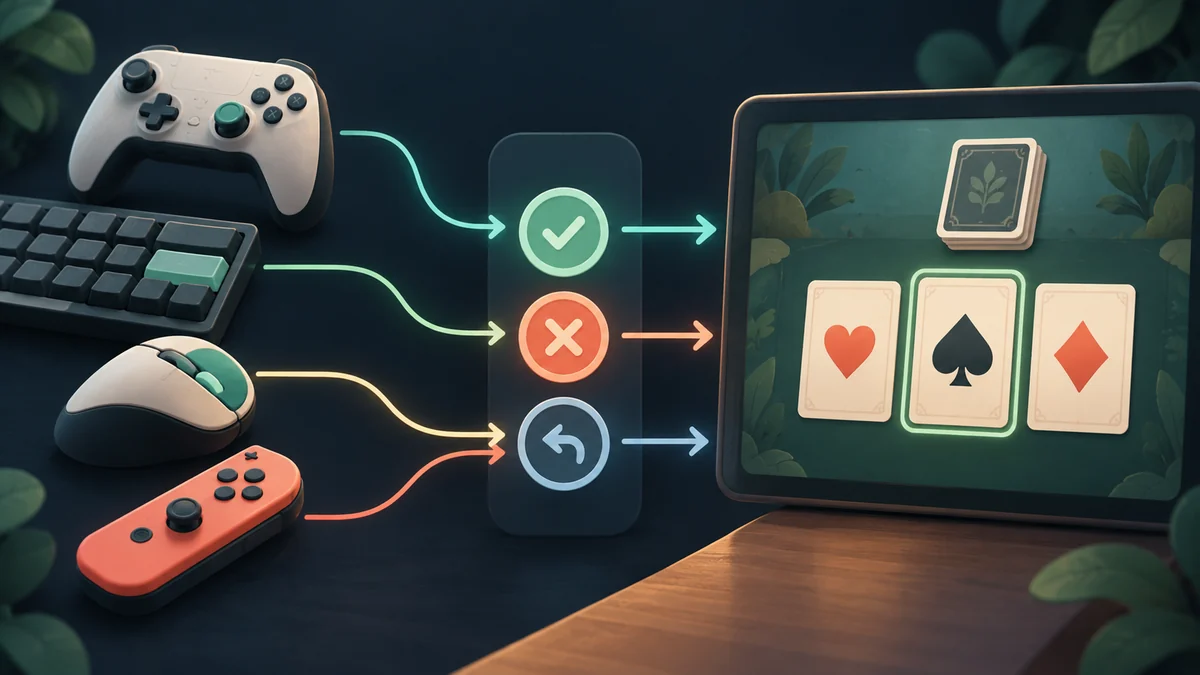
Name the player’s intention
An input action describes intention, such as confirm or cancel; its binding describes the device control. Unity’s Input System supports that separation. It helps a design keep the same meaning across a touch interface and a keyboard without scattering device assumptions through game rules.
Confirm describes intention; Enter and a button tap describe controls. When rules directly depend on one key, adding another control can require scattered changes. Unity’s Input System separates these through actions and bindings. Start with one meaningful action and connect two input routes to the same request. You do not need every controller or a full remapping interface immediately. First ensure that one action retains its meaning regardless of how the player invokes it.
One confirmation across two controls
Give one confirmation intention both a keyboard binding and a touch control. Verify that each reaches the same validation path. Then change screen focus while a control is held or a touch is repeated. The aim is consistent meaning, not identical physical behavior. A player should receive one accepted choice rather than an extra move caused by device-specific handling.
UI and gameplay input may coexist. With settings open, confirmation should not accidentally play the card underneath. Define which actions are active in each context and what changes on entry or exit. Also distinguish beginning, holding and releasing an input. Actions documentation explains input phases; choose according to the intended action. Otherwise a held control can produce unwanted behavior. Test the actual context switch rather than assuming one successful keyboard press proves the entire input route works.
Validate permission after receiving input
Receiving confirmation still leaves legality to the rules. Input expresses a request, not proof of turn ownership or card validity. Try touch and keyboard input at an invalid time and compare results. If they differ, check whether one route directly changes points or ownership while the other validates. Completion means a shared request with consistent outcomes: controls change while the acceptance rule stays the same.
Further reading: Unity Input System: Actions
For a related example, read Dalo’s Main Menu: A Clear Route to the Table.